
12 B2B Marketing AI Tools — I've Tried Them All. Here's the Honest Truth
A while back, an old friend of mine who runs an enterprise services business invited me out for tea.
A while back, an old friend of mine who runs an enterprise services business invited me out for tea.
He looked exhausted. His budget had been cut, his team had been cut, but the workload hadn't shrunk one bit. He'd heard AI could save the day, so he'd installed a pile of tools — and the team was still doing everything the old way.
I asked him what he'd installed.
He reeled off a list of names. The moment I heard it, I knew what the problem was. Every one of those tools had been put on errand duty: write a couple of lines of copy here, summarize a meeting there. That was it.
I told him, "You're not actually using AI. You're just giving it pocket change."
What do I mean by that? Let me first walk you through the three things AI should actually be doing in B2B marketing. Then we'll talk tools.
AI Is Off the Bench and in the Game
What does "AI becomes the main engine" actually mean?
The AI tools of the past were like interns: you gave one instruction, they did that one thing. Not anymore. Now AI can run the whole production line on its own: deciding who a lead should go to, adjusting campaigns based on performance, even knocking out the quality checks. Humans only step in to make the call at key moments.
That's great news for small teams. Enterprise-grade playbooks used to require enterprise-grade teams. Now, a small team with smart automation, real-time adjustments, and predictions distilled from historical data can put up a big-company showing.
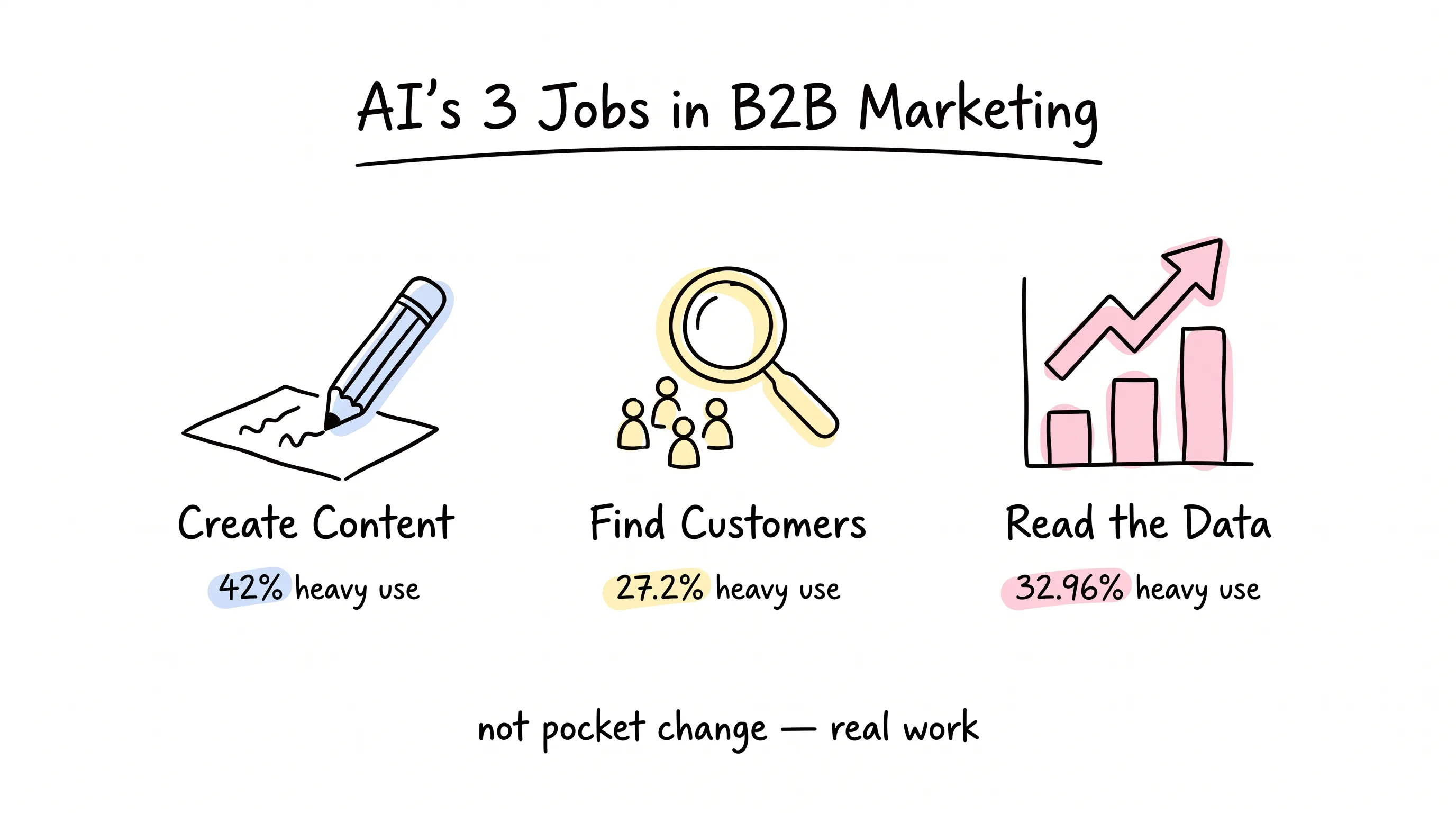
What are the three jobs? Create content. Find customers. Read the data.
Let's take them one at a time.
First, content.
The 2026 State of Marketing report has some numbers: more than 42% of marketers are already using AI heavily for content, and another 38% use it occasionally — writing blogs, posting on social media, drafting emails, producing product descriptions.
Here's how I use it: I have AI lay the groundwork with research and an outline, then I pick up the pen and add the human touch, then adjust for each client's preferences. After drafting, I send it back to AI to poke holes — where are the content gaps, what reads awkwardly, what quick win could I add. One pass like that gets you speed and quality together.
Second, finding customers.
The report has another set of numbers: 27.2% of marketers use AI heavily for lead scoring and customer segmentation, and 40.55% use it occasionally.
Think about how AI finds customers. It puts historical data, behavioral signals, and market trends together in one calculation to predict which prospects are most likely to close. It looks at engagement frequency, content preferences, every digital touchpoint. Put plainly: it turns "picking customers on gut feel" into "ranking prospects by probability." Sales only picks up the high-intent calls, and win rates go up while cycles get shorter.
Third, reading the data.
32.96% of marketers use AI heavily for data analysis, and 36.68% use it for market research and competitive analysis.
The value here is that decisions shift from "I think" to "the data says." Every marketing dollar can be reconciled against revenue.
Alright, those are the three jobs. Where do you start? Let's start with the tools.
The 12 Tools, Organized by What You Need Them For
One overall verdict up front: if I could keep only one of these 12 tools, I'd keep HubSpot. I'll explain why later. First, let's go through them one by one.
The Platform Player: HubSpot
HubSpot is the "everything bundle": marketing, sales, customer service, content management, operations, and commerce, all in one system. The AI is built into the platform — no extra wiring required. It also connects to 100+ external apps.
I rely on three things the most.
First, the Breeze assistant. A conversational AI companion: it writes blogs, web pages, and social posts; it can take content from one channel and break it into several; it pulls insights out of customer records and cleans up dirty data along the way. Most of my first drafts start with it.
Second, its agents. These are autonomous AIs built for real work: the data agent handles research, analysis, and Q&A, pulling scattered information from your CRM, calls, emails, and documents into one coherent picture; the personalization agent finds target audiences and mass-produces personalized content to lift ROI. I use them to fish my team out of repetitive work, so people can go do strategy and build relationships.
Third, Marketing Hub's automation: automatic data enrichment and cleansing, smart workflows, predictive analytics, plus ABM (account-based marketing) tools that put high-value opportunities in crisp priority order.
Oh, and HubSpot Academy has a free course on marketing automation. It's the first thing I recommend to every new hire.
There's only one pitfall: a lot of the advanced features are locked behind a paywall.
Pricing: the starter plan is $9 per month billed annually, or $15 billed monthly.
My verdict: if your company already runs HubSpot CRM, don't hesitate.
One warning: when you train agents, feed them your freshest CRM data. If the data is stale, the agent will chat with customers about pain points they stopped caring about months ago — and it will stumble out of the gate.
The Two Content Writers: WriterZen and ChatGPT
WriterZen is the war room for content work. Give it a seed keyword and Topic Discovery unfurls an entire landscape of topic ideas; Keyword Explorer and Keyword Planner automatically pull out the keywords you need at the planning stage; Content Creator then puts those keywords to work. I've tested it: hand it three keywords and ask for an outline, and what comes back is usable. It can also reverse-engineer a competitive SEO brief from articles that are already ranking. My habit is to layer an industry expert's perspective on top of that brief — the article instantly gets more solid.
Pricing is a one-time purchase: $75 for keyword research, $150 for full features, $225 for teams. Pay once, and that's it — very friendly.
The pitfall: on keyword research, it can't beat Semrush or Ahrefs, and a lot of features aren't in the free tier. So my approach is: WriterZen produces the topics and the brief, and I hand competitive analysis to Ahrefs or Semrush.
ChatGPT needs no introduction from me. I've used it to write content, generate images, analyze data, and write code. Ask it to outline a blog post, and it doesn't just give you an outline — it proactively asks: want an FAQ section? A CTA? Should I write the full article, handle SEO, adjust the tone? Hand that whole package to a writer and they can run with it.
Pricing: free in the US market; Plus is $20 per month, Pro is $200 per month.
The pitfall: it sometimes says wrong things with total confidence, and its information can be outdated; the free version is slow and lacks advanced features. So my rule is: drafts and images go to it, but a human must verify the facts before anything is published.
The Meeting Trio: Loom, Fireflies, Sembly
Start with Loom. It handles three things: screen recording, editing, and storage. Product demos for clients, onboarding training, proposal walkthroughs — record a clip and send a link. Videos embed in Google Workspace and Slack. Of its three entry points — desktop app, web app, Chrome extension — the desktop version is the most reliable. Its speech-to-text transcripts are accurate enough that you basically never have to fix them. The editing is adequate: trimming, stitching, backgrounds, text and arrows.
The pitfall: it only records and edits; it won't conjure videos out of thin air; the free plan caps out at 25 videos and 5 minutes per recording; and the software occasionally has small glitches.
Pricing: beyond the free plan, Business is $18 per person per month (billed annually), Business+AI with AI is $24, and enterprise pricing is negotiated. For heavy-duty editing, hand the job to professional tools.
Fireflies.ai runs your meetings. Meetings used to mean assigning the most junior colleague to take notes. Now I pull its bot into the meeting, or let it auto-follow my calendar, and the moment the meeting ends, the transcript lands in my inbox. It speaks 100+ languages and produces notes, action items, and key points in one go. It's SOC 2 Type II certified and complies with GDPR and HIPAA. My favorite feature is Magic Soundbites, which automatically clips highlight moments from meetings. Paid tiers add topic tracking — any topic mentioned in a meeting is one search away later.
The pitfall: the free plan caps out at 800 minutes, and talk-time analysis and unlimited integrations are not included.
Pricing: beyond the free plan, Pro is $10 per seat per month (billed annually), Business is $19, Enterprise is $39.
Sembly also takes meeting notes, but it plays a different game. It supports Google Meet, Teams, Webex, and Zoom, speaks 45+ languages, and accepts uploads in formats like MP3, MP4, and WAV. I once had it generate a report from a weekly meeting — one-sentence instruction, and the notes looked the part. It also filters historical conversations by meeting type, keyword, and attendee, and its AI assistant can answer questions and draft follow-up reports based on meeting content.
The pitfall: AI summaries occasionally drop details and contain errors; the free plan only allows 1 hour of recording per month, and there's no customer support.
Pricing: beyond the free plan, Professional is $10 per month, Team is $20, and higher tiers are negotiated.
Seeing How People Actually Use Your Site: Microsoft Clarity
Clarity does this: which buttons users click on your site, what they skip, where they scroll off. A heatmap tells the whole story in one image; session recordings let you follow a visitor's mouse step by step.
The best part is the price: free. Even the fancy technical features are free.
I connect Clarity to Google Analytics for the deep data; connect it to Google Ads and HubSpot, and ad and lead data flow together; third parties like Adobe and WordPress hook in too. It even has Copilot built in — ask it in plain language "why is this page losing traffic," and it breaks it down for you.
The pitfall: no real-time data or event tracking; session recordings occasionally stutter.
How I use it: before taking over a client's site, I install Clarity and let it run for a while, then write my improvement proposal from the data — and suddenly it's twice as convincing.
The Phone Tool: CloudTalk
This one may be less familiar. It's an AI phone system, founded in 2016 in Bratislava, now handling 400+ million customer conversations a year, serving 5,500+ companies, with local numbers available in 160+ countries.
Outbound calls run on the AI Sales Dialer, with three modes — preview, power, and parallel: dial curated lists one by one, or push big lists across several lines at once. Voicemail Drop and answering machine detection keep salespeople from burning time on dead numbers, and any number on a page dials with one click.
Inbound calls run through the Call Flow Designer: IVR menus (the automated phone menus callers navigate), queuing, skill-based routing, with supervisors watching it all in real time from the backend. Call data writes natively back to HubSpot, Salesforce, Pipedrive, Zoho, Zendesk, and Intercom, and API, webhooks, and Zapier extend coverage to 40+ more tools.
Its AI voice agents come in two tiers, and the split is well designed. AI Receptionist handles inbound: answering 24/7, routing, transferring — without touching your systems. AI Specialist handles end to end: from CRM updates to payment collection to outbound campaigns, one task followed all the way through. Both respond in under 800 milliseconds, speak 60+ languages and accents, promise 99.999% uptime, and a non-technical person can stand one up in 10 minutes.
The customer scoreboard: Trevo reaches 20x more customers per campaign; Kourse doubled its connect rate and tripled its meeting volume; Autenti saved the 30% of calls that would have gone to humans; Oxford Royale Academy replaced four seasonal hiring roles with one AI agent.
The pitfall: call transcription requires the Conversation Intelligence add-on — not in the base plan; the voice agents don't have a native MCP server yet; some features live in higher tiers, so check your must-have list before signing.
Pricing: the phone system starts at $25 per person per month (billed annually) across three tiers — Lite, Essential, Expert. Voice agents are billed by the minute: Receptionist is $99 per month with 200 minutes, Specialist is $349 per month with 1,000 minutes, and beyond 10,000 minutes per month it's $0.15 per minute.
One practical tip: use the included 50-minute free allowance to handle after-hours calls. It's the cheapest live test of your intercept rate — that's exactly how Autenti saved their 30%.
The Project Manager: ClickUp
ClickUp gathers all your apps and AI agents into one platform. I can import tasks from Monday, Asana, Trello, and Notion, or from Excel and CSV. Once they're in, AI assigns work automatically by priority. I just ask it "what's on my to-do list" — faster than digging through boards myself. ClickUp Brain can draft project plans, break them into subtasks, and report progress in real time.
How powerful is it? A Forrester study says: 384% ROI over three years, $3.9 million in total revenue growth, 92,000 work hours saved by consolidating tools, payback in under 6 months.
The pitfall: the free plan only has 60 MB of storage, and AI features are out of the question; the learning curve is steep, and the team needs someone willing to climb it.
Pricing: beyond the free plan, Unlimited is $7 per person per month (billed annually), Business is $12, and enterprise pricing is negotiated.
My advice: bring it in for complex projects with long tool chains. For simple projects, it's overkill.
The Prospecting Home Turf: LinkedIn
LinkedIn has 1 billion+ members across 200 countries. The bulk of my B2B leads come from here. Beyond lead hunting, I use its ads, Sales Navigator, and recruiting tools.
Its AI can write comments and draft messages for you, the interface is smooth, and it doesn't get in the way. Sales Navigator is paid, but worth it: filter target accounts by company, seniority, and industry instead of flipping through profiles one by one. Account IQ is even better — generative AI condenses everything about a target account into one in-depth summary.
The pitfall: having AI write entire posts for you doesn't work; and the free tier can't support serious prospecting.
Pricing: beyond the free tier, Premium Career is $29.99 per month, Premium Business is $59.99 per month.
An old saying applies: people do business with people. Your personal profile and your company page — run both in parallel.
Collaboration and Scheduling: Slack and Motion
Slack needs little introduction. I open one channel per client, and internally we split by HR, writers, and design, so nothing steps on anything else. For a quick ad-hoc meeting, Huddle opens with one click. The most useful part is finding things: AI-powered natural language search lets you ask "what was our Q1 sales strategy," and it digs the conversation out and can even summarize it.
The pitfall: with too many channels, messages get hard to find; notifications keep popping up and get annoying; and onboarding takes time.
Pricing: beyond the free plan, Pro is $8.75 per month (billed annually), Business+ is $18, and enterprise pricing is negotiated.
Two small habits: turn off notifications for unimportant channels, and leave channels nobody is using.
Motion is a calendar that schedules itself. It arranges your day automatically around your tasks and priorities; it merges multiple calendars into one master calendar; set a recurring task once and it manages itself every month. It also proofreads documents, takes meeting notes, and builds workflows — like a part-time assistant. It suits solo operators, and big teams can lean on it too.
The pitfall: customer support is poor and issues sometimes drag on unresolved; the interface could be smoother.
Pricing: for individuals, Pro AI is $29 per month and Business AI is $39; for teams, Pro AI is $19 per month and Business AI is $29.
How Do You Choose? My Five Yardsticks
Tools done. If you're still eyeing other options, how do you judge?
My scorecard has five yardsticks, each worth 20%:
- Accuracy. Are its cited sources reliable? Is the information it produces correct?
- Usability. Is it easy to pick up? Do you have to reach for the manual?
- Results. Does its output actually achieve the goal?
- Efficiency. Is it fast? Does it genuinely save time?
- Integrations and customization. Can it plug into your existing tool chain? Can it be customized per client?
Measured by these five yardsticks, my conclusion: HubSpot 5, the undisputed number one; ChatGPT 4.5; Fireflies, Clarity, CloudTalk, ClickUp, LinkedIn, Slack, and Sembly at 4 each; WriterZen, Loom, and Motion at 3.5 each.
A 3.5 doesn't mean bad — it means each has visible shortcomings. Anything 4 and above is safe to try.
What Is the 30% Rule?
Finally, one idea I deeply believe in: the 30% rule.
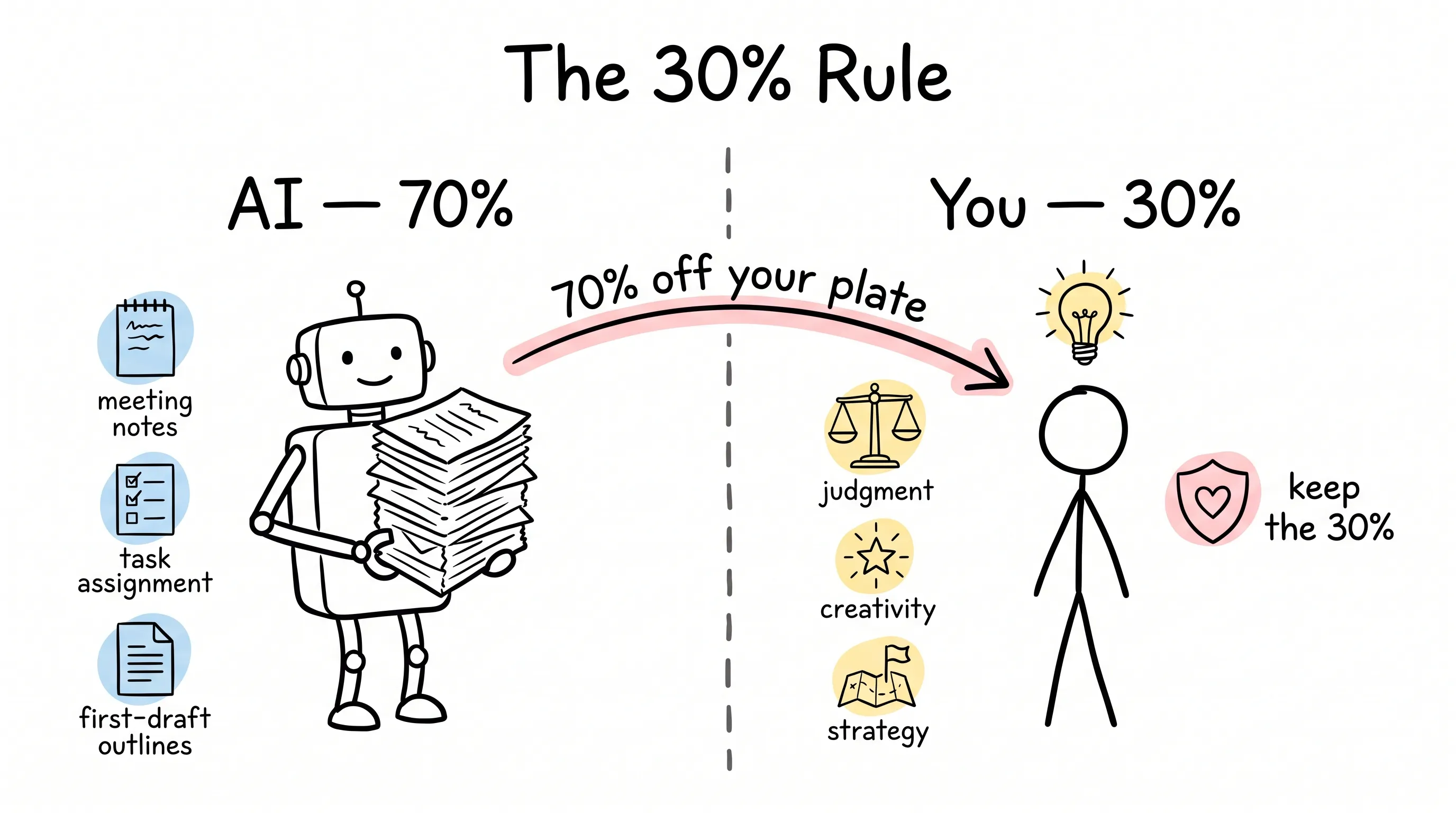
What is the 30% rule? AI does 70% of the work. Taking meeting notes, assigning tasks, building first-draft outlines — all the repetitive parts go to AI. The remaining 30% stays with people: judgment, creativity, strategy. AI shouldn't touch those — and it can't do them well anyway.
AI is there to get the work done; you're there to make sure it's done right.
That's also my answer to the old question "will AI take our jobs?" Plenty of people worry about it. But once you really start using AI, you notice: what AI takes over is the work you never wanted to do anyway. The time and people it frees up go toward strategy, relationships, growth.
I think of my friend over tea. Later I gave him one line: stop giving AI pocket change — put it to work at the table.
He connected HubSpot's agents to his CRM, and in the first week had them clean up three months of backed-up customer data. He told me: should have done this ages ago.
My wish for you: put AI at the table, sooner rather than later. Let it do the 70%, and you hold on to your 30%.
Continue reading
Related articles
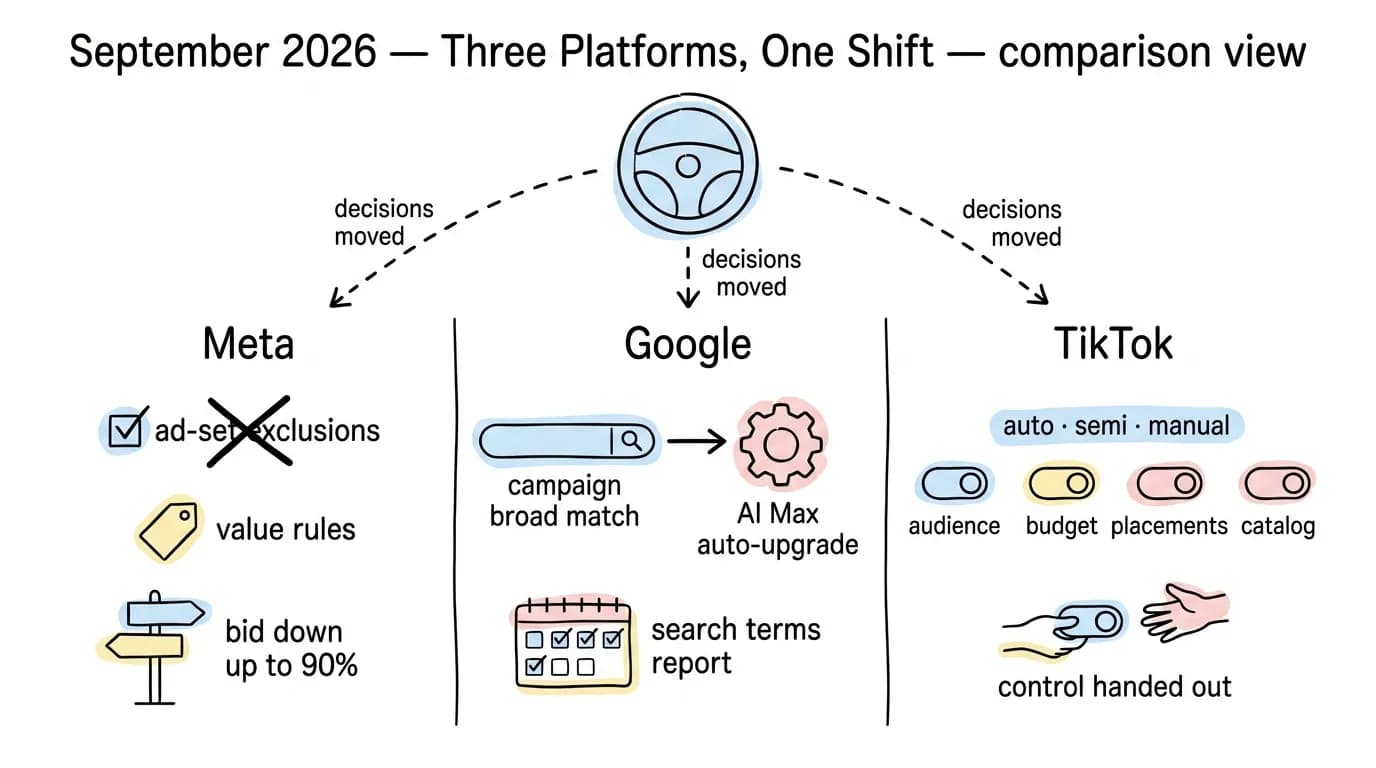
In September, Three Platforms Took Away Part of Your Steering Wheel
A few days ago, I went through everything the three big ad platforms did in September 2026. And I noticed a remarkably interesting coincidence.
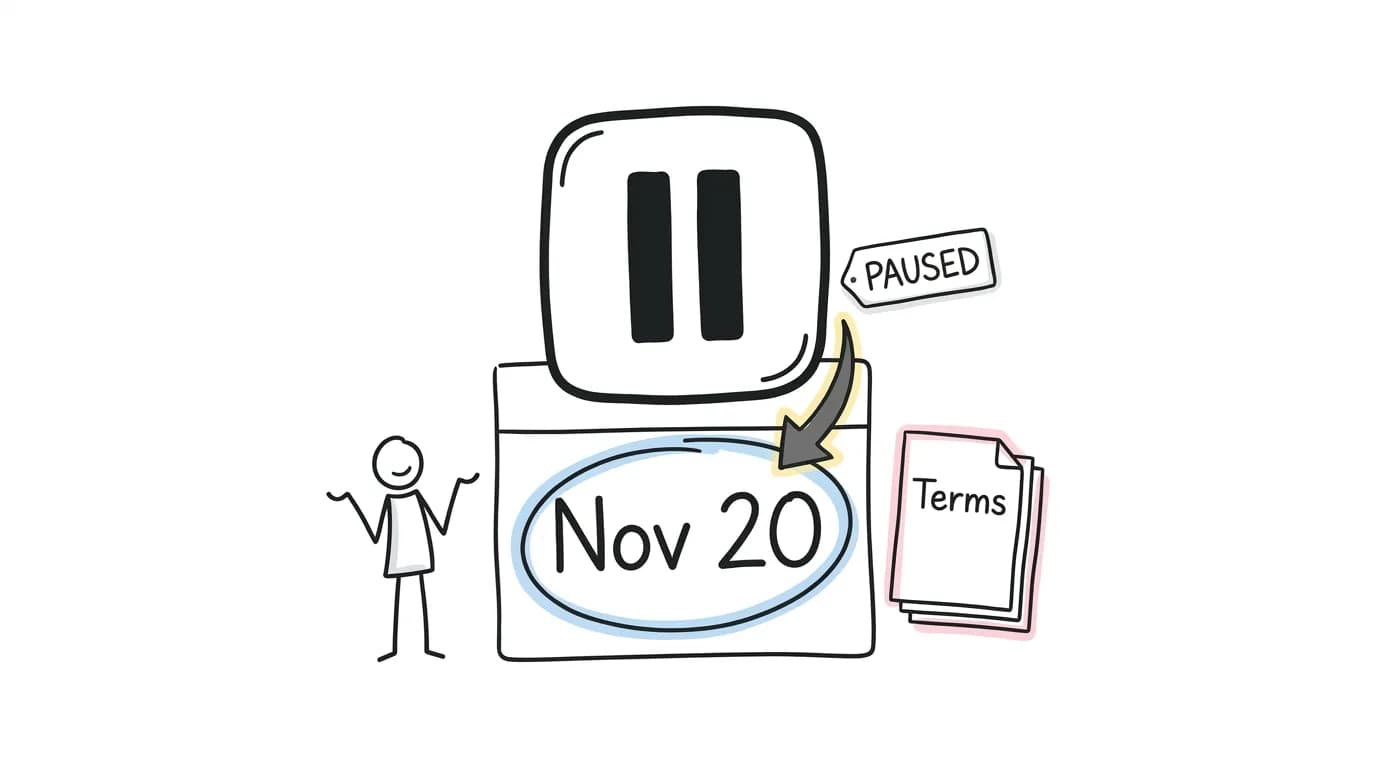
Meta's New Terms Hit the Pause Button on the Eve of the Effective Date
A while back, I was helping a friend of mine who runs a cross-border e-commerce business go through the compliance checklist for his ad account.
Google and Meta changed 17 ad rules this week. 6 of them need checking today.
A few days ago, I was helping a friend who runs a cross-border e-commerce business go through his ad accounts.