
Search Volume Hits a Five-Year High, Yet the Stock Dropped 10%: Every Move Google Made in AI Search This Month
A monthly roundup of Google's AI search changes: multi-turn ads in AI Mode, more prominent clickable links in AI Overviews, AI-written citation summaries, a Source preferences button, and Bing's Topics Portfolio report, with practical steps for website owners.
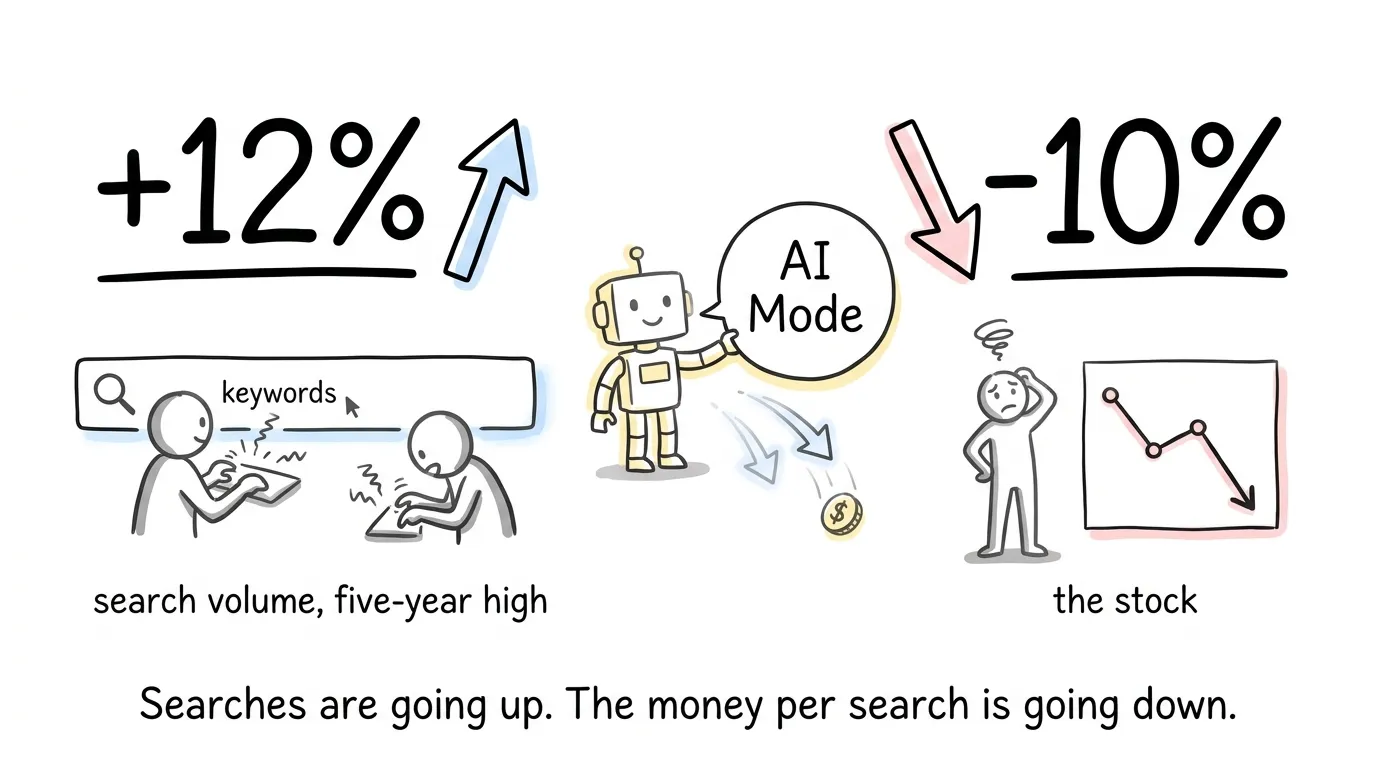
Earlier this month, Alphabet released its Q3 earnings.
I stared at two numbers for a long while.
Search volume: up 12% year over year — the fastest in five years.
The stock: down roughly 10%.
Search revenue: about $1.6 billion short of Wall Street's expectations.
What does that mean? More people are using Google Search than at any point in the past five years. Yet the capital markets took that report card as bad news.
Why?
Because the way people search has changed.
More and more people no longer dutifully type in keywords — they chat with AI instead. Conversational answers like AI Mode hand you the answers directly: you finish the chat and leave, and clicks on traditional ads are visibly falling.
Searches are going up; the money earned per search is going down.
The audience keeps growing; the money keeps thinning.
Google CEO Pichai compared this moment to the great migration of over a decade ago, when users moved from computers to phones. Mobile ads didn't make money at first either — not until Google figured out how to earn on the small screen.
Put plainly, Google is now playing season two of the "mobile moment." Last season, it survived. This season, it cannot afford to lose the bet.
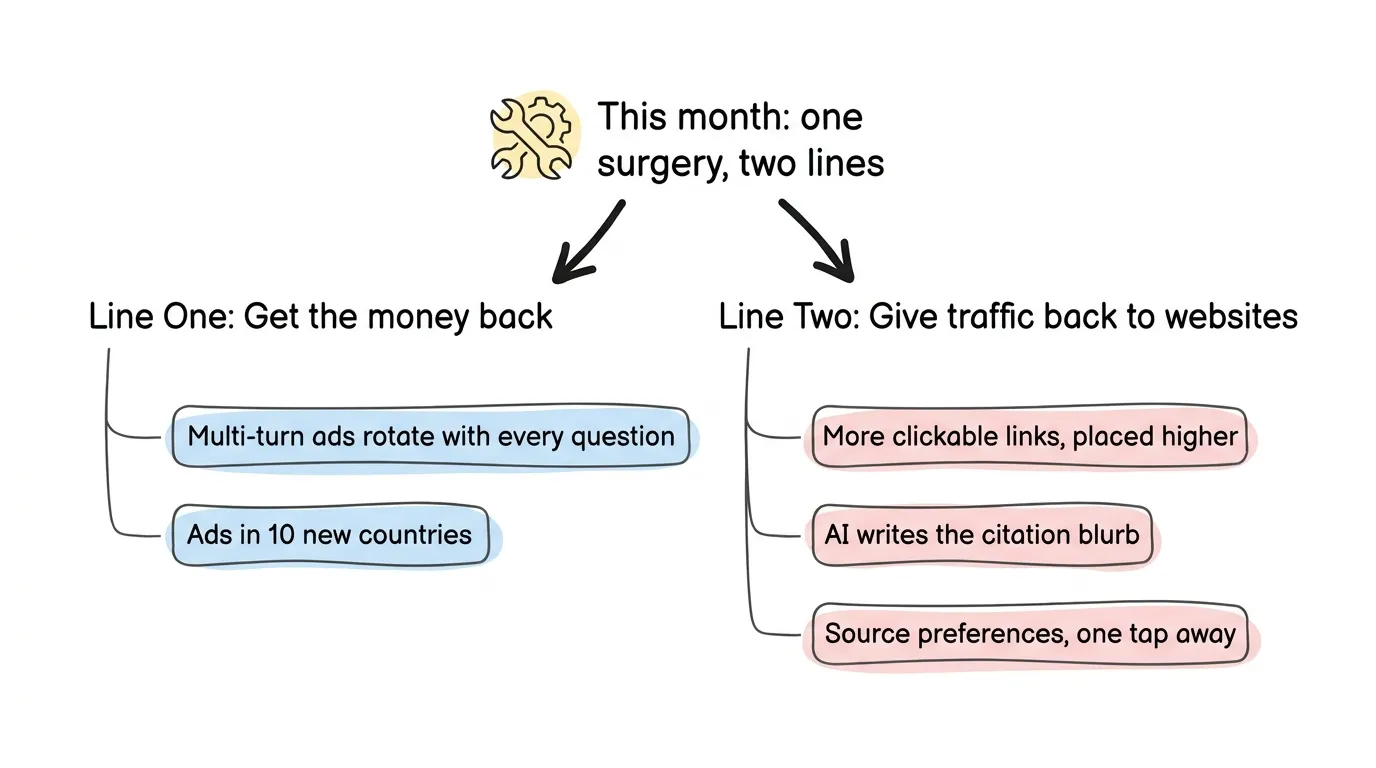
So this month, what surgery did it perform to solve this problem? I went through the news, and every move falls along two lines.
One line: get the money back. The other line: give the traffic back to websites.
Let's take them one at a time.
Line One: Putting Ads Inside the Conversation
Google launched something new in the US, called multi-turn ads.
What are multi-turn ads? As you go back and forth with the AI in AI Mode, the ad slots rotate with every question you ask. Ask "where to go hiking this weekend," and it pushes hiking boots; follow up with "where to take the kids," and it switches to family campgrounds.
It's a bit like walking through a shopping mall. Say one more sentence to the sales assistant, and he swaps in a fresh batch of goods before you.
Not just the US. Ads in AI Mode rolled out this month to 10 new countries — India, Canada, Australia, and Singapore are all in the first batch. Later this quarter, they'll reach the UK, Brazil, and Mexico.
The logic here is blunt: conversational search is the new shelf. Wherever the shelf is, the ads must follow.
Line Two: Giving the Traffic Back to Websites
If the ads are Google rescuing itself, then the moves below are about recruiting allies.
However clever AI search gets, the answers still need sources. Who are the sources? Those of us who honestly make content. If you get cited and gain nothing from it, gradually nobody will want to be cited. Google does that math better than anyone.
So this month it did something it hadn't done in years: it pushed links toward the front of the stage.
1. More Clickable Links, Placed Higher
Google updated AI Mode and AI Overviews to surface more clickable links and place them higher.
The most eye-catching item is a new display slot called Quick results from the web, which gives you two official-site links right at the top of the answer.
What does "straight to the official site" mean? Here's an everyday example. You run a gym; someone searches your store name, or asks a question that carries your name, and Google may now push your official page straight to the top. A few years ago, that was unthinkable.
There are several smaller changes too, all circling around the same thing: the click.
Article carousels rolled out to more countries and more languages, and the carousels now flag Preferred Sources — sites a reader follows get bumped forward.
At the end of some AI answers, related-article links with thumbnails have appeared, designed to be more tempting to click than before. What does this mean? It means your blog's cover image is now, for the first time, directly part of the click-through rate. If the cover image fails, the article never even gets the chance to be opened.
In AI Mode's video results, Google has started testing clickable names for creators and publishers — one tap takes you straight to their Google Search Profile. If you've claimed your Search Profile, your name can become a link.
Taken together, these moves point to a single judgment: Google wants people to re-learn the habit of clicking links inside AI answers.
If you want to catch this wave, there are three moves. Write each page around one specific question — the AI's inline links attach next to the passage that supports them, and the more specific your answer, the more likely it gets attached. If you publish a blog, make the cover image solid — in the thumbnail era, visual quality is click-through rate. And then, using the Google Account settings on your phone, set your own website as a Preferred Source. It's a one-minute job. Don't put it off.
2. That Blurb on the Citation Card — the AI Wrote It for You
This change is more subtle, and many people haven't caught on yet.
On the AI Overview citation card — the source card that appears next to or below the answer — Google has started placing a summary written by its own AI.
SEO analysts spotted the change. The gist of what they said: this text doesn't actually exist on the page; Google writes it on the spot, based on what it believes is most relevant to that query.
What does that mean?
Before, that blurb was excerpted from your page. Now, Google's AI writes a "self-introduction" on behalf of your page.
It's a bit like a blind date. Before, the matchmaker read out the résumé you wrote by hand. Now, the matchmaker looks at your file and improvises on the spot.
You can't control what the matchmaker says. But you can control the file itself.
If the first few paragraphs make clear what the page is about and who it's for, the AI's improvisation will land on target. Write it vaguely, and it can only introduce you vaguely.
Vague content gets a vague summary. Specific content gets a specific summary.
How to actually do it? On every key page, answer the questions it needs to answer in the first few paragraphs — that's the raw material the AI draws on when it generates the summary. Straighten out the heading hierarchy — a structure a human can grasp at a glance is also easier for the AI to read accurately. As for whether there's a switch to control that summary — no, don't waste time looking.
3. The Source Preferences Button, Moved Next to the Citations
The third thing: Google is testing a new button in AI Mode's citation sidebar: Source preferences.
What does this button do? One tap opens your Preferred Sources list directly — add or remove on the spot, without leaving the results page.
The feature was spotted in a short demo video making the rounds recently.
Before, if a user wanted to set you as a Preferred Source, they had to burrow into the settings and dig around. Now, they see your article cited in an AI answer, decide the site is trustworthy, and can add you right away.
It used to be sending the user off to the store to sign up for a membership card. Now the clerk passes the registration book over to their hand.
The window of opportunity has shifted from "someday, when I get around to it" to "right here, in front of you."
Preferred Source carries no small weight. Websites added by users appear more prominently in AI Overviews, AI Mode, Top Stories, and Google Discover.
So don't wait on this. Add a Preferred Source prompt to your own website — sidebar, top of the article, inside the body, any of these work. One tap from the user, a checkbox in the popup, and it's done. If a reader genuinely feels your article helped, you've given them a one-second way to say so.
Google's own documentation spells out the exact wiring — just follow it.
Beyond Google: Another Map Worth Half an Hour of Your Time
Having covered Google, let's talk Bing. Don't dismiss it for being small — what it gives you is exactly what most tools don't.
Inside the AI Performance report in Bing Webmaster Tools, a new feature has launched: Topics Portfolio, still in beta.
What does it do? It bundles the queries where AI answers cited you into clusters by topic, letting you see at a glance: in AI search, what do you actually look like?
The table has four columns; let me translate them for you.
Topic — a bundle of related queries, like "Blog Traffic and Analytics" or "SEO and Search Optimization."
Topic Size — how much total AI search demand this topic carries across all websites. How big the pie is.
Sites Cited — how many websites are fighting over this topic. How crowded the competition is.
Queries — how many real citing queries this topic contains.
Most SEO tools show you keywords and search volume. This table tells you: on which topics you are actually being cited by AI, how many times, and where there's still open ground.
If you run a local business, my advice is to start from the topic clusters you already have. Open one and look at the grounding queries inside — that is, the phrasings you've actually already been cited for. Then look at the opportunity queries — queries Bing considers related to this topic but where you haven't been cited yet.
And what are those? Those are the questions your customers are asking right now, that you're perfectly able to answer, but where the AI hasn't found you yet.
One table, pointing out exactly what to write next.
Two reminders. It's a beta — the topic classification is done automatically by AI, and occasionally it files a query into the wrong pile; when you see a mis-filed one, give a thumbs up or thumbs down in the tool as feedback. Also, if your site can't see this tab yet, the data volume may not be there yet — check again in a few weeks.
Back to Those Two Numbers
12%. 10%.
One is the strongest search growth in five years; the other is a no-confidence vote cast by the capital markets.
Google is taking apart and reassembling the most profitable machine it spent twenty years building. Lose the bet, and the ad empire loosens; win the bet, and it keeps running the table in the AI era.
For Google, this is a high-stakes gamble.
For you, this may be the most real window in years. For the first time, AI search is seriously, and at scale, pushing links toward the front of the stage — and it has handed users the power to choose who they want to hear from.
The door has cracked open. But it only opens for those who came prepared.
Write your pages clearly, get your cover images right, put the Preferred Source prompt up, and read Bing's map once through.
When the wind comes, you'd better already be in the game.
Continue reading
Related articles
It's 2026: Stop "Buying" AI Tools for Your Marketing Team — Start "Hiring" AI Agents
This learn article explains how AI agents differ from standalone AI tools in marketing, outlines three agent categories — build-your-own platforms, CRM-native agents, and vertical tools — and covers use cases across SEO, social media, advertising, and reporting, plus criteria for choosing one.
What Is GEO? How Your Brand Gets "Mentioned" in the Age of AI Search
An explainer on GEO (Generative Engine Optimization) for e-commerce and DTC brands: how it differs from SEO and AEO, why AI answers shape brand visibility, and eight practices covering question-focused content, consistent brand messaging, structured pages, external evidence, comparisons, and AI mention tracking.
AI Is Already Making Decisions for Your Customers. Are You on the List?
A learn article explains GEO (Generative Engine Optimization): why AI-generated answers now shape which brands customers see, and how SEO fundamentals, entity clarity, citable evidence, and monthly measurement affect visibility in AI answers.