
Shopify's AI Ads: Why You Turned Them On and Are Still Losing Money
A learn guide on why Shopify stores lose money with AI ads: what the three-layer setup really is, cold-start signal issues, a 70/20/10 budget split, human-versus-AI creative division, tracking setup checklists, and weekly profit metrics such as blended ROAS and payback period.
A while back, an old friend of mine in cross-border e-commerce texted me at 11 p.m.
Last year he opened a Shopify store selling home goods. Early this year, he heard that "AI can now run your ads automatically," and eagerly turned on one-click campaign launch. Half a month and ¥40,000 later: twenty-some orders. When he ran the numbers, he was losing money.
He asked me: is AI just not good enough?
I told him: AI is fine. The problem is that the "AI ads" you imagine and the AI ads that actually exist are two very different things.
In this piece, I'm going to walk you through the exact path he retraced, broken down step by step. Nothing mystical — every bit of it is something you can actually do.
What Exactly Are Shopify AI Ads?
Let's kill one illusion first.
A lot of people believe that once you're on Shopify, AI just takes over your advertising. You sleep; it makes sales.
Dream on.
Shopify is genuinely stuffing AI into every corner of running a store. The major update wave early this year shipped more than 150 features in one go, with AI woven into nearly all of them. The direction is right.
But when it comes to advertising, Shopify doesn't call the shots.
Why?
Because the platforms that actually run your ads are Meta, Google, TikTok, and their peers. Billing happens there, ad review happens there, attribution rules live there, and your ad account assets live there too. What Shopify can do is feed your products, orders, and data to those platforms, so the platforms' AI gets a fuller meal.
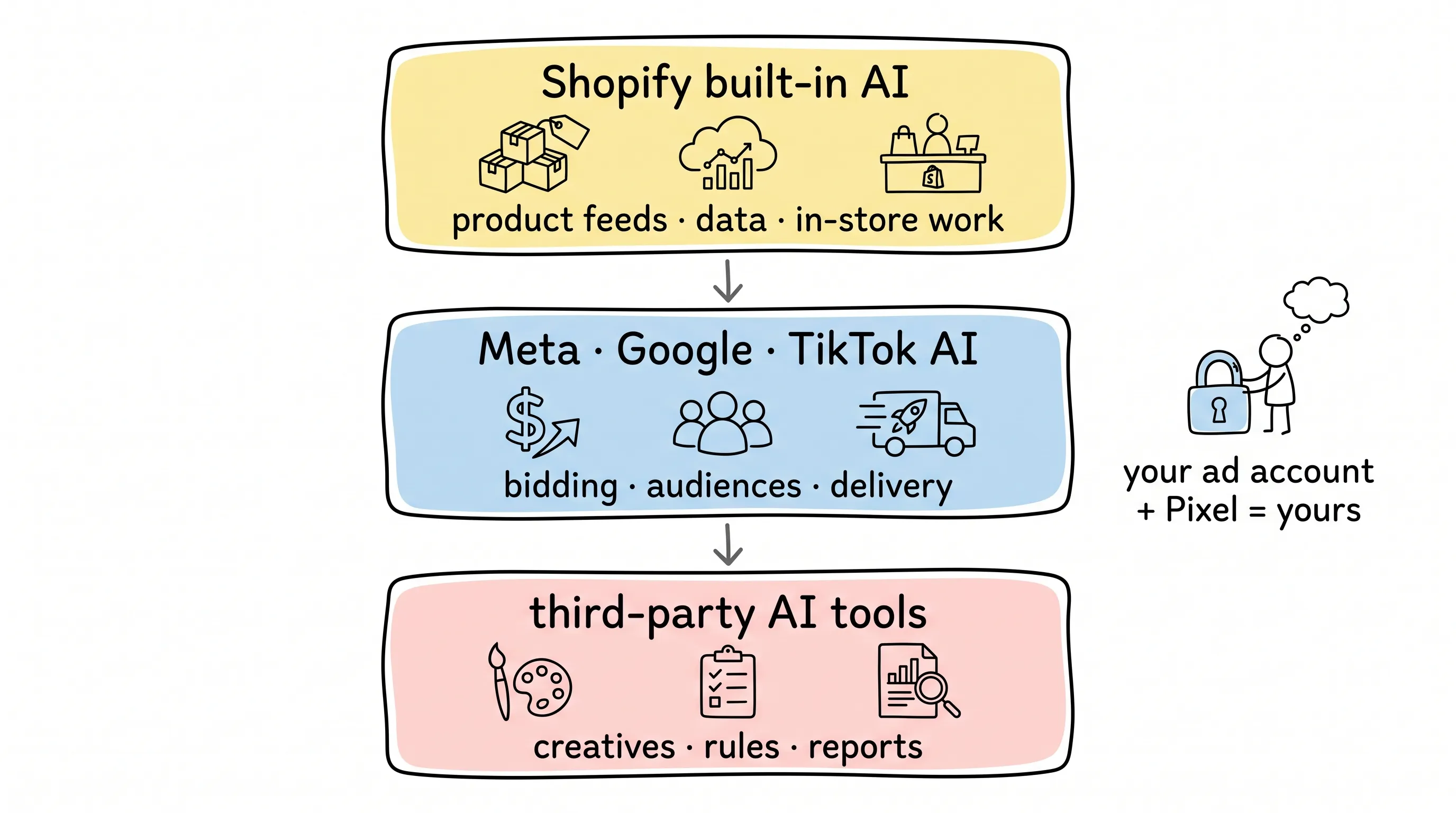
So what people call "Shopify AI ads" is really three layers.
Layer one: Shopify's built-in AI. It handles in-store work — product feeds, workflows, some creative assistance. It runs on your own catalog and order data.
Layer two: the ad platforms' AI. The delivery systems at Meta, Google, and TikTok handle bidding, audiences, placements, and creative rotation.
Layer three: third-party AI ad tools. Apps wedged in the middle that generate creatives, set rules, and produce reports.
Each layer has its job. But there's one thing you must never lose control of:
Your ad account and your Pixel must be yours. Never let a tool vendor hold them for you.
Think about it: the account is an asset, something you nurture for ten years. The day the tool vendor quits, raises prices, or disappears, the account goes with it — and there's no one left to cry to.
What Can AI Actually Do for You?
Start with the platforms' own numbers.
Meta has published results for AI-driven delivery: ad clicks up 3.5% on Facebook, conversion rates up 3% on Instagram.
There's a lift. But honestly? It's not earth-shattering.
Where AI genuinely shines is the grind: exploding one creative into dozens of versions — swapping images, videos, copy; expanding audiences outward to reach buyers manual targeting could never reach; adjusting bids, shifting budgets, picking placements on your behalf; and reading the data to spot what's rising and what's falling.
The tiring, fragmented grind — AI does it ten times faster than any human.
And what can't AI do for you?
Your promotion cadence. AI doesn't know when to cut prices and when to hold the line.
Your margin floor. AI doesn't understand your books. All it sees are the platforms' conversion signals — never your profit-and-loss statement.
Your brand judgment. What you can say, what you should never promise — AI doesn't care, and when things go wrong, that's on you.
Your product detail page. This one is the killer.
Here's the uncomfortable truth: if your product page doesn't convert, AI will not fix it. AI will only deliver people to that non-converting page faster, more precisely, and at greater scale.
It's like paying a race-car driver when the car is broken. The harder you floor it, the faster it falls apart.
AI is an amplifier. It magnifies what you get right — and what you get wrong.
Cold Start: Why Do Nine of Ten New Stores Lose Money?
I've watched far too many new stores turn on ads, start losing money, and conclude that AI advertising is a scam.
That's unfair to AI.
Nine times out of ten, new-store ad failure comes down to a single cause: the signal is too weak.
What does "weak signal" mean? The system hasn't accumulated enough clean purchase data yet, so it doesn't know what kind of person actually opens their wallet in your store. Push it toward "automation" at this stage, and all it can do is guess blindly. Blind guessing — how could that not lose money?
TikTok's own official advice is telling: set a new campaign's daily budget at 30x your historical customer acquisition cost (CAC), and never below 10x. And for the first 7 days after launch, leave it alone — big changes derail the learning phase.
Do the math. If your estimated CAC is ¥50, your daily budget has to be ¥1,500. Why so expensive? Because the platform needs to accumulate enough conversion samples within that budget every day before it can learn anything.
With a small budget and little data, AI has nothing to cook with.
So for a new store's cold start, my advice is to climb the ladder one step at a time.
Step one: don't touch ads yet — clean up your product feed first. Titles, specs, prices, images, one by one. This is AI's grain. If the grain is spoiled, nothing good grows from it.
Step two: when purchase data is still too thin, temporarily optimize for smaller events like add-to-cart, so the system can stockpile samples.
Step three: as soon as purchase volume steadies, switch back to optimizing for "purchase" — don't linger. Every extra day you optimize for add-to-cart is another day the system goes hunting for people who love clicking but never buy.
Before you spend a cent, run through the rest: Does the product page load fast? Are shipping and return policies written clearly? Does the ad promise the same offer as the detail page? Are Pixel and server events double-firing? Are images sharp, and do they look like your brand?
Once it all passes, open the floodgates.
How to Split the Budget: 70 / 20 / 10
Now for structure — the second big pit most stores fall into.
First, a common pattern. Many stores run retargeting only, chasing everyone who viewed a product or added to cart. It feels great early on — conversion rates are high. And then? The audience is only so big. Advertise to them daily and frequency climbs, costs climb, until it feels like "the ads just stopped working."
They didn't stop working. You emptied the tank.
A funnel needs a source. Google released a stat: YouTube has been the most-watched streaming platform in the US for nearly three years running. What does that tell you? Discovery is where the volume is — most buying desire gets sparked while people scroll content. Pinterest piled on with its own stat: its users plan seasonal shopping more than twice as often as everyone else.
So here's how I'd split the structure.
Prospecting takes 70% of the budget. Broad targeting, creative testing, goal: attention.
Consideration takes 20%. Target people who've already engaged, with reviews, demos, buyer photos. Goal: trust.
Conversion takes 10%. Target cart-adders and checkout-page visitors, with a clear offer. Goal: purchase.
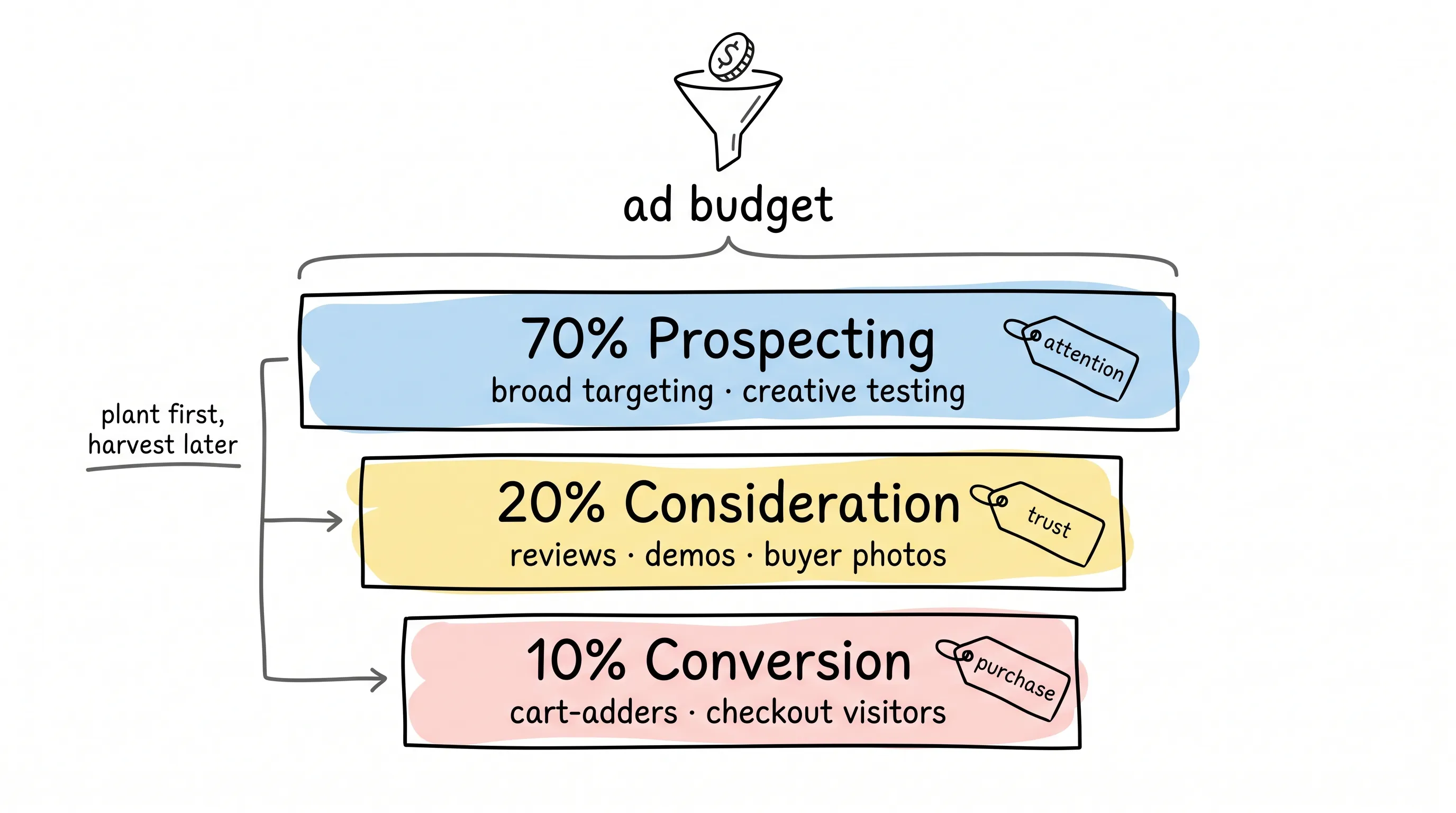
Why does prospecting get seventy percent? Because running conversion retargeting alone is all harvest, no planting. Nothing planted this year, nothing to harvest next year.
Retargeting hides one more nasty trap, and I want to flag it specifically.
If your ads to cart-adders only produce sales when you're running a discount, you're not scaling.
You're domesticating. You, with your own hands, taught your customers: wait for the sale, never pay full price.
So pair retargeting with exclusion rules, watch frequency, and don't hammer the same group until they're sick of your face. Better to lose a few add-to-carts than to train your customers into coupon hunters.
Creative: The Machine Handles Variety, You Handle Soul
Your catalog has images, prices, specs — AI really can mass-produce creatives in one breath.
But more creatives doesn't mean more sales.
TikTok shared one case: creative iteration with its Symphony automation tools cut acquisition cost by 50%. Where did the savings come from? From trial-and-error that was fast and organized. AI made iteration faster — but the order came from you.
So how do you divide labor between humans and AI? My split is simple.
AI gets the variants: same angle, different hooks, sizes, formats; product-benefit labeling; localization when demand surfaces in a new market.
And four things stay yours, non-negotiable.
The angle. What customer problem are you solving? That's strategy. AI cannot decide it for you.
The proof. Why should anyone trust you? Demo, reviews, before-and-after — you decide.
The timing. Why buy now? How do you frame the offer?
The brand voice. What's in bounds, what's out.
Having AI spit out ten headlines in one go? Absolutely fine. But the bar for keeping one is a single rule: it must sound like your brand, and it must match the detail page.
What does the weekly loop look like? That friend's team now runs this cadence: 3 angles per week, 3 hooks per angle, 2 calls to action — 18 creatives in total. Winners stay in rotation; new challengers come in weekly.
When you read the data, watch three questions: Who's absorbing the budget? Whose CAC stays stable even as you scale their spend? Is frequency climbing while CTR is falling?
One more time, because it matters: what the ad promises and what the detail page delivers must be the same thing. AI can trick someone into a click. It can't trick them into paying.
The Pre-Launch Setup Checklist
Dirty results come from dirty data eight times out of ten. This section is pure execution — work through it like a checklist.
On the Meta side, seven steps.
Connect Shopify to Meta properly — don't cut corners. Verify your domain. Confirm the Pixel sits on your own domain, not on some plugin's. Check the four key events one by one: view content, add-to-cart, initiate checkout, purchase. Place a real test order and confirm "purchase" fires exactly once, not twice. Make sure catalog IDs match up. Finally, run one complete end-to-end order.
On the Google side, the core is one line: treat your product feed like a retail shelf. A messy shelf, and customers walk straight out. Accurate titles, consistent prices, GTIN filled in whenever you have it, categories assigned sanely, inventory and shipping info truthful, landing pages not slow.
One number worth noting: per Google's data, advertisers using Enhanced Conversions and value-based bidding saw an average of 8% higher return on ad spend (ROAS) on Search ads.
Every bit of cleaner data makes the machine one bit smarter.
Should you add server-side tracking? Yes. Browsers are cracking down on cross-site tracking, and browser-only tags bleed signal badly. First-party data plus server-side callbacks feed the platforms higher-quality signals — that's what lets their optimization aim straight.
Finally, Run the Numbers
Everything so far has been about campaign delivery. This section is about the business.
The platform's reports have no "profit" metric. They only hand you conversion data. Whether you make money is your own problem.
Google published a measurement guide with a number that stopped me cold: 83% of CEOs want marketing to articulate its value clearly, yet 45% of CFOs have cut marketing budgets because they couldn't see the line connecting spend to value.
Translated: if you can't show whether the money made money, there's nothing to discuss with the boss.
So every week, watch five numbers. Each one hides its own trap.
Blended ROAS — total revenue divided by total ad spend. Trap: hiding a bad channel's waste under "other."
New-customer ROAS — revenue from new customers only. Trap: counting repeat buyers as growth, fooling no one but yourself.
Payback period — how long the ad spend takes to come back. Trap: pouring money in while cash flow is already stretched to the limit.
Contribution margin — what's left after costs. Trap: watching revenue while ignoring margin — the bigger you scale, the faster you bleed.
When a number dips, what do you check? Blended ROAS down: audit discount depth and channel mix. New-customer ROAS down: audit prospecting creative and exclusion rules. CAC rising: check whether tracking broke, whether the detail page leaks, whether creatives are fatigued.
Install the guardrails before you need them: budget caps, cost targets, ROAS floors, exclusions for loss-making SKUs, region restrictions, frequency caps. A cheap conversion is only cheap while it's still profitable.
When you have spare capacity, run incrementality tests: pause ads in one region and see if total sales drop. Use geo splits or control groups to verify the true lift your ads deliver. If your data volume isn't there yet, don't test. Clean the tracking first, steady the campaigns first.
Final Words
Remember the friend from the beginning — the one who lost ¥40,000?
His fix came down to three steps: repair the tracking, clean the feed, and take back ownership of the ad accounts. Then he rebuilt the structure around 70/20/10 and fed it 18 creatives a week. By week five, the numbers turned. Today his store's monthly profit is far higher than it ever was in the "one-click, sleep-to-earn" fantasy era.
He said something I think deserves to be framed: "AI didn't make me work less. It made me put my effort in the right place."
That's really all there is to it.
Shopify's AI ads are a powerful machine. But the steering wheel, the gas, and the brakes must stay in your hands the whole time.
Don't expect AI to think for you. Make it work for you.
Here's hoping every dollar of ad spend you burn comes back with an echo you can hear.
Continue reading
Related articles

Cross-Border Business: Time to Upgrade Your AI Toolbox
A learn article explaining how AI tools help cross-border e-commerce sellers clear five hurdles: language, regulation, logistics, payments, and fraud. It outlines a five-compartment toolbox, a five-step adoption path, and metrics such as conversion rate and CLV, while cautioning against over-reliance on AI.

AI Is Taking Over the Dirty Work of Social Media Marketing, One Task at a Time
This learn article outlines four social media marketing tasks AI can handle — audience analytics, content drafting and design, ad targeting and creative testing, and spam moderation — and cautions that taste, judgment, and data security remain human responsibilities.

AI Is Already This Good — Why Is Your Social Media Marketing Still Pure Manpower?
An overview of 18 AI tools for social media marketing, organized into six categories covering audience research, content creation, scheduling, comment and DM handling, ad management, and visual production, plus notes on personalization, prediction, and emerging trends.