
AI Is Already This Powerful — Why Do Only 6% of Marketers Dare Let It Write?
A learn article explaining why most marketers use AI for inspiration rather than finished drafts, and laying out a five-step workflow covering usage policies, tool selection, briefs, prompting, and editing.
A few days ago I was leafing through a report, and a set of numbers stopped me for a long while.
In 2024, HubSpot released a State of Marketing report, asking marketers around the world: when you use AI for content, what do you mainly use it for?
45% said: finding inspiration.
31% said: building outlines.
18% said: helping with drafts.
Only 6% dared to let it write the finished piece.
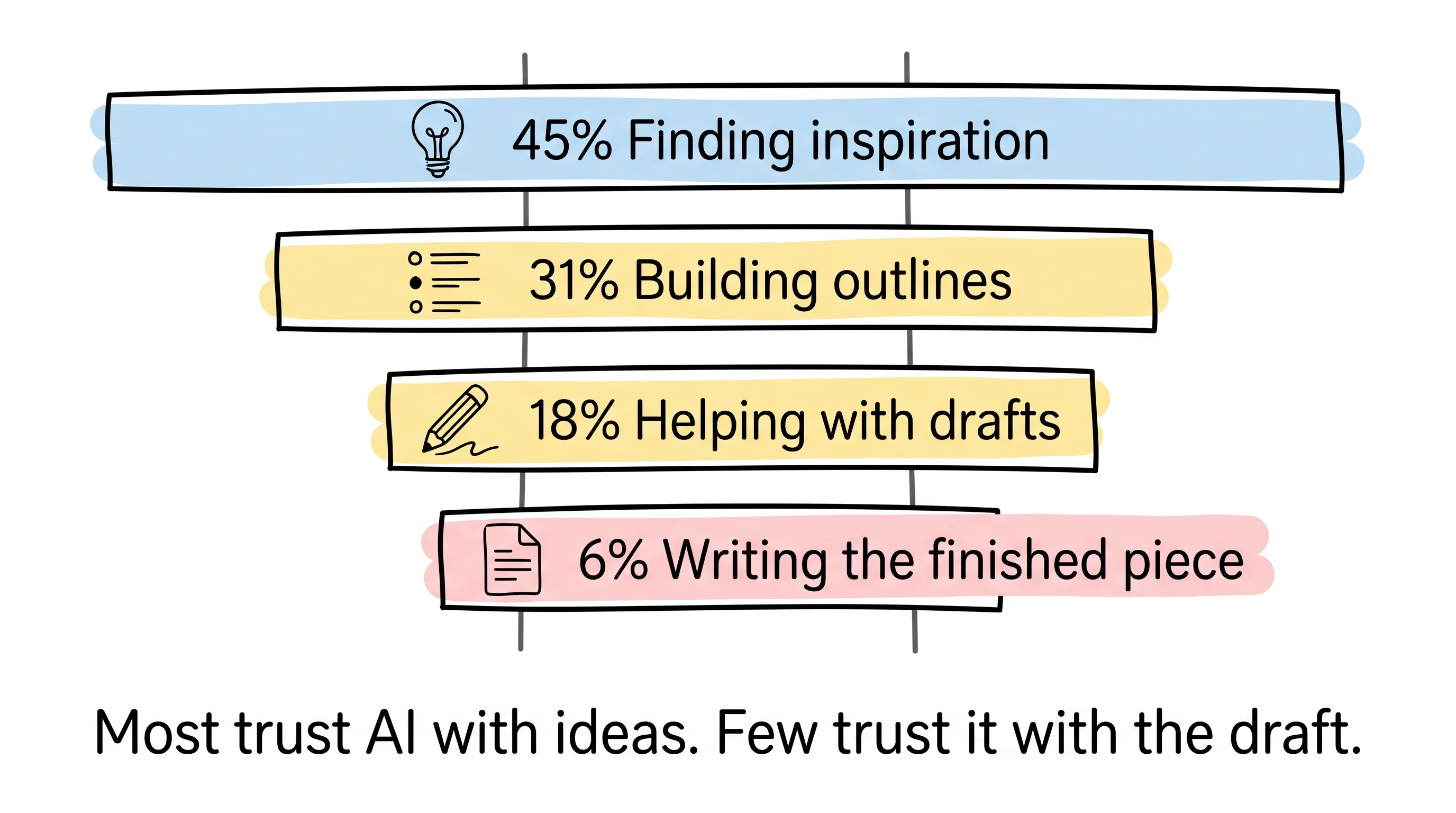
Good grief. AI can already write, draw, and edit video — how come the vast majority still only trust it as "the idea person"?
I chewed on this question for a long time, and recently I finally thought it through. This article is my attempt to explain it to you.
First, Know This: AI Has Two Faces
What is AI? Many people lump them all together, but the ones doing the work are two completely different crowds.
One crowd is called Generative AI. It creates something from nothing: articles, images, videos, music. ChatGPT is this kind.
The other crowd is called Predictive AI. It doesn't produce content; it only makes judgments: scoring sales leads, predicting which customer is about to churn, dynamic pricing, optimizing ad placement. It's like a fortune-teller — only the kind that reads your historical data instead of your palm.
For people who make content, the first kind is what they deal with most every day. So that's what we'll mostly talk about today.
It Can Genuinely Do a Lot — But It Also Plants Land Mines
The good news first.
Research efficiency is AI's most underrated value. When you're digging through materials on a platform, you can follow up on the spot: What's the basis for this paragraph? What about a different angle? Can you add more context? What used to require opening ten web pages now takes a few sentences. Add SEO suggestions, content optimization, and batch production, and as efficiency goes up, costs naturally come down.
But everything always has a flip side.
Copyright risk, algorithmic bias, data privacy — those three are well-worn warnings. What's more deadly is the fourth: the information it gives you may be outdated, wrong — and wrong with total sincerity.
AI doesn't know what it doesn't know. The industry calls this "hallucination": confidently inventing a case that doesn't exist, complete with citations. If you're not an expert in that field, you absolutely cannot spot it.
So you see, "automated research" and "outdated data" are twin risks. You love it for the speed; it can burn you for it.
So should you still use it?
A Camera Obscura From Centuries Ago Answered This Question Long Ago
First, let me tell you a story.
There's a tool called the camera obscura, and it is very old. In its earliest form it was a box the size of a room: fitted with lenses and mirrors inside, it projected the three-dimensional world outside onto a two-dimensional plane on the wall, in fine detail.
What did painters do? They traced the projection.
Leonardo da Vinci used one. Michelangelo used one. Rembrandt very probably used one too — there's plenty of evidence.
Think about it: would we say those paintings don't count as masterpieces because the masters "traced"?
No.
Tools have never produced creation by themselves. Without a human eye watching from behind, they are nothing.
AI is the same. It has come to amplify your creativity. The premise is that you must first have creativity for it to amplify.
Once you think this through, how to use AI becomes smooth. I've boiled the right approach down to five steps.
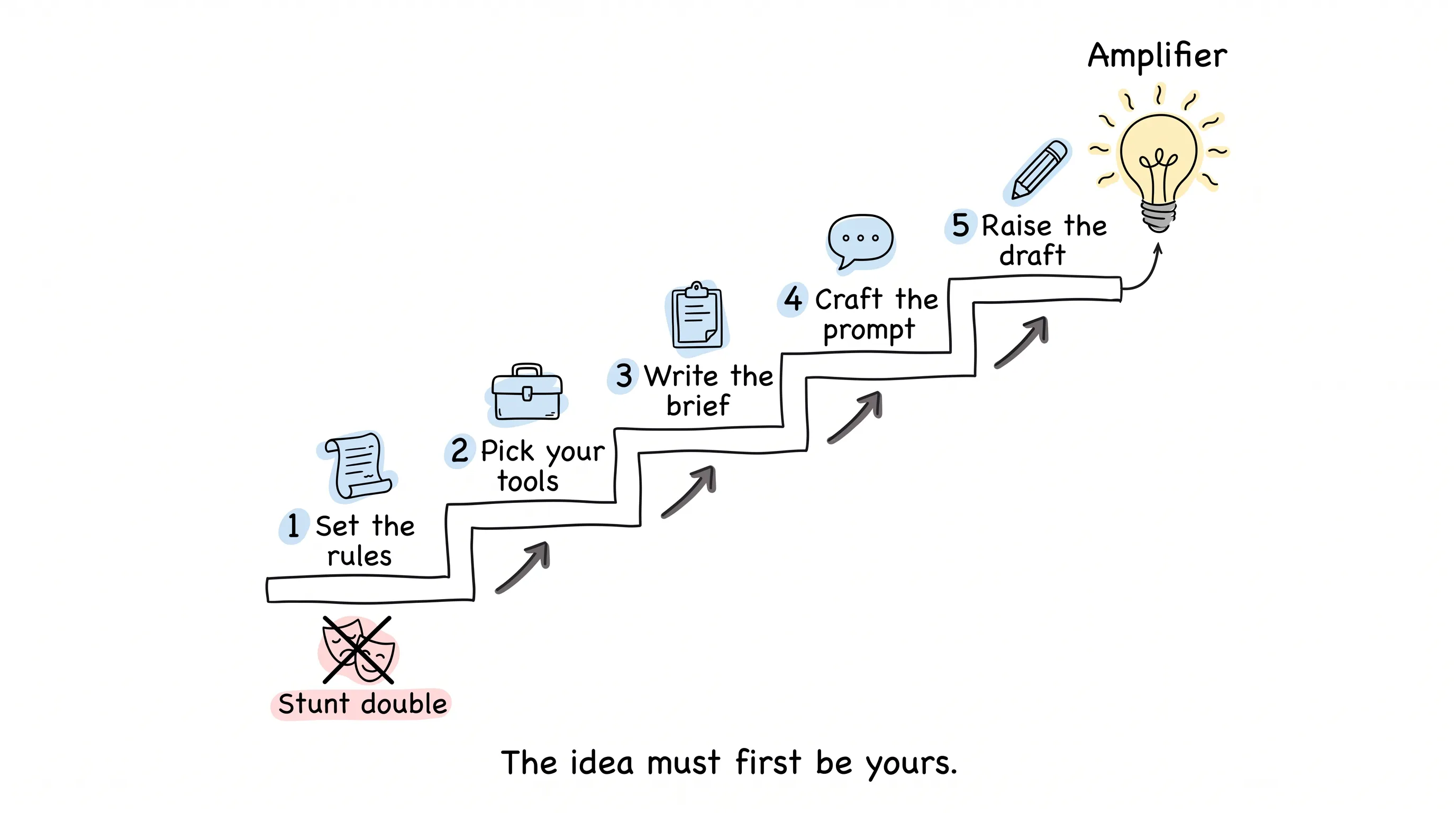
Step One: Set the Rules First, Then Talk About Usage
Many teams have AI accidents not because the technology is bad, but because no rules were set at the very beginning.
A true story. An employee at Samsung pasted internal code into ChatGPT for help, and the code ended up publicly leaked. Once the story spread, Samsung simply issued a blanket ban and suspended use for everyone.
With an agreement in place beforehand, would it have come to that?
So the proper approach is to first set an AI usage policy at the company level. At minimum it must cover four areas:
- Who uses it within what scope. Who may use it, what they may do, and what is firmly off-limits.
- How data is managed. What can be fed to AI and what absolutely cannot, aligned with industry and company confidentiality requirements.
- Who takes responsibility for errors. Everything must pass review before publishing; anything uncertain goes to a domain expert for a check; accountability lands on named people.
- Transparency and oversight. Leave records of the process, decide whether to disclose AI use to readers, audit regularly, and update the policy as soon as regulations or tool terms change.
Once the rules are set, the second step is picking tools.
Step Two: Before Picking a Tool, Know What You're Really Paying
Franklin said the best investment is investing in the tools of your own trade. Tools are the marketer's trade.
But before picking, there's a brutal premise: for free things, what you pay isn't money.
It's data.
Every piece of internal material you feed in may become nourishment for its training. So before "free to use," ask first: am I willing to let my proprietary information become its textbook?
When you pick concretely, the waters run deep. Here are a few insider things I found while researching.
Many tools run on the same engine under the hood. The AI image generators on some stock-photo sites, and Microsoft Copilot, all run on OpenAI's DALL-E at their core; Canva's image generation runs on Stable Diffusion.
The same prompt, given to different tools, produces results with hugely different styles. It's like a painter's signature style — see enough of them and you can tell at a glance "this one is AI-made," sometimes even which company made it.
Risk levels differ even more dramatically. Adobe Firefly takes the compliance-trained route: generated images carry watermarks and the risk of being sued for commercial use is low, at the cost that the clause about "will your content be used for training" is written rather vaguely. Midjourney's images look good, but it's entangled in copyright disputes — weigh it before commercial use.
One marketer did an experiment: the same set of prompts, fed separately to Firefly and Midjourney, made ten paired comparisons, then asked people to vote on which executed better. Most people voted for Midjourney — the results were genuinely more stunning. Later, someone retested Firefly with the same prompts; the improvement was limited.
What was most telling was the Spider-Man group. Firefly, because it had no license for Marvel characters, blindly invented a character nobody recognized; the other side's product, you recognized as Spider-Man at a glance.
Which one is more likely to get you sued is plain as day.
By the way, HubSpot itself also ships with a row of built-in AI tools: a website generator, a content assistant, a social-media copy generator. Especially the one for writing email subject lines — with a fifteen-hundred-word long article, how to condense it into one sentence that makes people want to click — its suggestions often save the day.
Tools chosen, the main event begins.
Step Three: Write AI an Onboarding Brief
What's a creative brief? To put it plainly, it's the instructions you write before work starts for a new employee who is extremely talented but knows nothing about your company.
Company background, the goal this time, target audience, competitors, content format, core message, customer benefits, tone of voice, call to action, distribution channels. Ten boxes — fill them all in before starting work.
Why be this exacting? One rule of thumb: garbage in, garbage out.
However strong the AI algorithm, if you feed it vague instructions, what it returns is mediocre content — and never original. The more context you give, the more presentable its work.
Think about it: when you hire a new person, don't you wish you could explain the background, the goals, and the taboos all at once, so they get it right the first time and don't redo work back and forth? With AI, use exactly the same mindset. Don't treat it like a search engine. Treat it like a member of your team waiting for you to onboard.
By the way, doing audience personas works the same way. AI can produce a first draft, but what real users look like — go ask the salespeople who deal with customers every day. Don't fully trust its imagining.
Step Four: Turn Prompting Into a Craft
With the brief ready, it's the prompt's turn. A few field lessons, each one paid for with a scar.
Use positive phrasing. If you want an overcast scene, never write "no bright sunny day." Once you write the words "sunny day," it will most likely paint you a sunny day. Say it directly: overcast, grayish tones. A prompt doesn't understand "don't" — it only understands the words you actually wrote.
Say only one thing at a time. Wanting a title, body copy, and an image all at once, it easily drops the ball on some. Split it apart. Step by step.
Keep wording consistent. Don't say "users" one moment, "customers" the next, then "persona." It will treat these three as different things. Fix one word, and the results are far more stable.
Give full parameters. For social copy, tell it the word limit; for images, give it the camera language — "wide angle" or "close-up" — said clearly, much more reliable than letting it guess the composition.
When stuck, ask it back. This is a technique many people don't know: you keep revising the prompt and the result is still weird? Ask it directly: why did you answer this way? Most AI can explain its own logic. Once it says it, you'll know where the deviation is.
A few more opening plays: have it create ten eye-grabbing email subject lines — remember to give a word limit; have it play your target reader and ask where he would go to find answers; have it put two things together and compare; have it rewrite a long article into a video script. All useful.
Only expansion needs care. Let AI expand based on its own output, and after a few rounds quality visibly slides, the same points going around in circles. When it starts smelling off, don't hesitate — discard the draft.
Step Five: Raise AI's Draft Until It Sounds Human
By this step, you're holding a draft that's seventy or eighty percent there. The real work starts now.
Set quality standards first. What the brand's tone is like, how industry words are spelled, which words may never appear, how titles and quotations are formatted — the clearer the rules, the less AI drifts. If the company has never defined its brand tone, that's just right — take this chance to define it.
Coach it like a team member. Does well, give a thumbs-up; does badly, tell it where it fell short. It remembers this feedback.
Then, breathe in the human touch. Break long sentences short so the article is easy to skim; add real cases only you know; let a little humor in where appropriate; if it fits the brand tone, use empathetic expressions like "I get it" and "we've all been through this."
Stories and details are the part AI cannot invent for you, and also the only part readers will remember.
Finally, what everyone cares about most: how does Google treat AI content?
Google's stated position is clear: it won't punish you just because content is AI-generated. But in its eyes there's no "written by AI" label — only good content and bad content. By its standard of Experience, Expertise, Authoritativeness, and Trustworthiness (the industry calls it EEAT), bad content gets no ranking all the same.
So don't agonize over being identified. Spend the effort on the content itself. Also build an AI content workflow: fact-checking, expert review, SEO checks, readability scoring — don't skip a single step, and actually schedule the time on the calendar. On tools, something like Semrush's SEO Writing Assistant, or Yoast on WordPress, can score readability and originality for you. Both have free versions — try before you buy.
Oh, and if you're doing SEO, remember it's a long game. Build topic clusters around core keywords, using one sub-topic piece after another to support the main keyword; if you want speed, push to the top with paid placements, and keep ad keywords and SEO keywords as aligned as possible — the two sides feed each other.
Back to That 6%
Now look again at the numbers at the start, and the meaning all comes out.
45% of people use AI to find inspiration; 6% let it write directly. What's missing isn't technology — it's understanding. Those who know how to use it treat AI as an amplifier; those who don't treat AI as a stunt double.
AI can magnify your ideas tenfold. But that idea must first be yours.
May your next viral hit give half the credit to AI. The other half goes to you, still revising drafts late at night.
Continue reading
Related articles

Cross-Border Business: Time to Upgrade Your AI Toolbox
A learn article explaining how AI tools help cross-border e-commerce sellers clear five hurdles: language, regulation, logistics, payments, and fraud. It outlines a five-compartment toolbox, a five-step adoption path, and metrics such as conversion rate and CLV, while cautioning against over-reliance on AI.

AI Is Taking Over the Dirty Work of Social Media Marketing, One Task at a Time
This learn article outlines four social media marketing tasks AI can handle — audience analytics, content drafting and design, ad targeting and creative testing, and spam moderation — and cautions that taste, judgment, and data security remain human responsibilities.

AI Is Already This Good — Why Is Your Social Media Marketing Still Pure Manpower?
An overview of 18 AI tools for social media marketing, organized into six categories covering audience research, content creation, scheduling, comment and DM handling, ad management, and visual production, plus notes on personalization, prediction, and emerging trends.