
Afraid of Losing Brand Control, So You Don't Dare Test AI Max? Google Officially Retired That Concern on August 20
This article explains how Google's August 20 updates to AI Max experiments add brand and location controls, when Performance Planner applies, and which advertiser situations warrant testing now versus waiting.
A while back, I had dinner with a friend who runs Google Ads campaigns.
I've seen his account: mostly brand keywords, a serious budget, a professional team. Yet in all the months since AI Max launched, his Experiments panel has stayed empty.
Why no tests?
He had exactly one reason: experiments couldn't carry brand exclusions (ads kept off other brands' searches). If AI Max sent traffic to competitors — or to search terms completely out of left field — who would answer for brand safety?
I told him: that reason of yours? Google officially retired it on August 20.
He froze for a beat.
That day, Google published a post on its Ads & Commerce blog covering three things in one go. The three were in completely different states: one already usable, one only half there, and one that won't arrive until September.
In this piece, I'll take all three apart. Once they're laid out, you can find which one is you — and decide: test now, or wait a little longer.
What Is an AI Max Experiment?
First, sixty seconds of background.
What is an AI Max experiment?
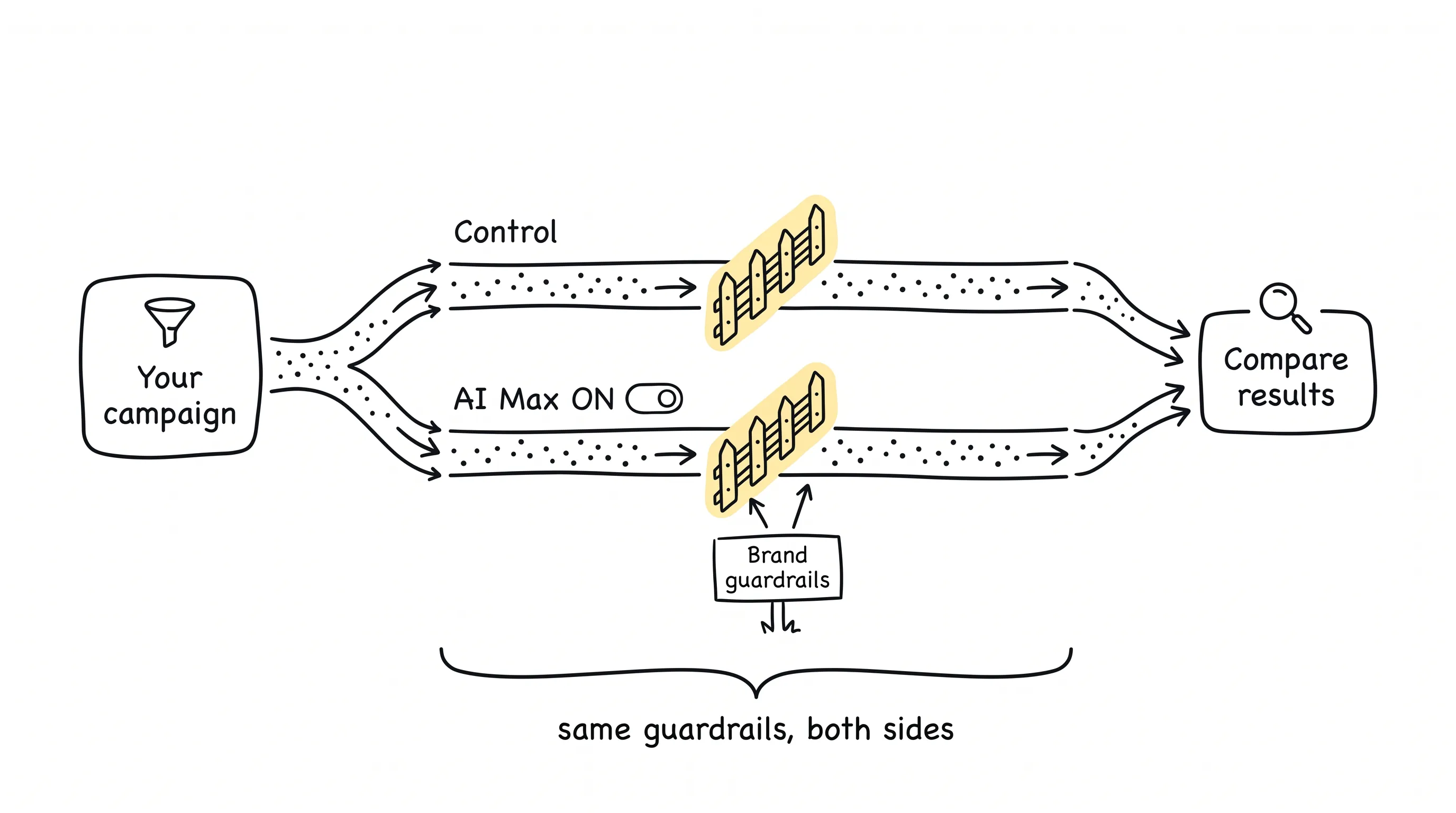
Simply put: you split off a share of traffic from your existing Search campaigns and feed it to the arm with AI Max turned on; the rest runs as before, serving as the control group.
Note: it does not copy your campaign.
That design is a completely different animal from the old custom experiment. The old way was to clone a campaign and test the clone; the new way is to rope off half the dining room in the same restaurant to try a new menu — it's still the same restaurant.
Google says this change brings three benefits: faster results, fewer setup mistakes, a shorter learning period. Those three are the vendor's own claims; the docs never say on what grounds. But the structural fact underneath them is real: the test runs inside your existing campaign, not inside a replica.
Keep that in mind. Everything about how the brand guardrails work later is built on it.
One Post, Three Tenses
That August 20 post: three paragraphs, three features.
The beauty is in how Google spoke about the three features in two completely different voices.
Paragraph one, multi-campaign A/B testing: a single experiment spanning multiple Search campaigns, testing different budget and ROI targets. Its second sentence opens with: Rolling out in September. A September launch. Which day? Not stated.
Paragraph two, brand and location controls in experiments: the new capability "lets you run tests with these settings enabled, starting today." Present tense. No beta tag, no date, no "coming soon" of any kind.
Paragraph three, Performance Planner: you can now see how bid or budget changes would affect existing campaigns and apply them with one click. Present tense again, likewise with zero qualifiers.
Think about it: when a company uses two different tones for three features in a single post, that difference in tone is itself information.
Tone is an availability signal.
Unfortunately, most of the industry news flashes that covered it that day blended all three items into one and wrote them up as "will support." Readers relying on secondhand summaries would assume all three features arrived as one batch.
One word apart, one quarter apart.
Brand Controls: Not Only Announced — Written into the Docs
Of the three features, brand controls deserve the deepest dive — because it's the only one that checks both boxes: "announced in the blog" and "written into the docs."
In the post, the words "new capability" link straight to the About AI Max experiments page in the Help Center. That page spells it out in black and white: brand settings are Step 5 of the experiment setup flow — configure Brand inclusions and Brand exclusions. Nowhere on the page is there a rollout date, a beta label, or a "coming soon."
More critical still are three details.
First: even if your base campaign still uses legacy brand controls — or has no brand controls at all — you can add them directly in experiment setup, no migration required first.
Second: the brand inclusions and exclusions you add during setup automatically apply to both the control group and the experiment group, for the entire duration of the test.
That second point is the soul of the whole mechanism.
Think it through: when both sides run under exactly the same brand guardrails, then after the test ends, the difference between the two data sets can only be attributed to the AI Max switch itself.
Guardrails on both sides — then, and only then, the difference belongs to the switch.
Third, the wind-down rules are spelled out too: if you don't apply the experiment, every AI Max setting rolls back automatically; if your base campaign had legacy brand controls, it returns to those controls; if it had none, whatever was added in the experiment is deleted.
Set your guardrails, run the test, don't want any of it afterward — dust off your hands, and everything is back the way it was.
For the friend from the opening, this is where his one and only concern evaporated.
Location Controls: Half an Open Case
What about location controls?
This is the part of the whole piece where I owe you complete honesty.
In the post's own sentence, brand and location appear side by side: "If you rely on specific brand or location controls, testing is now easier." Grammatically, location controls belong to the "can use it now" group.
But.
That experiment setup page in the Help Center talks about brand settings from top to bottom. The word "location" never appears.
The location controls feature itself is real: a separate Help page documents locations of interest, which sit at the ad group level beneath campaigns and target people by geographic intent. Broad match keywords keep working as usual, one ad group can select multiple locations, and everything stacks on top of campaign-level geo targeting.
But that's documentation for the general feature. A document that slots it into the experiment setup flow — writing it out as a numbered step the way brand settings are — doesn't exist.
Two possibilities: either Google hasn't written that part of the documentation yet, or location controls do appear alongside brand controls in experiment setup and simply lack their own write-up. From primary sources alone, you can't tell.
So the correct move comes down to one action: open your account.
In your own experiment setup flow, if location controls stand next to the brand step, the official statement and your account's UI corroborate each other — test with confidence. If they don't, don't take one sentence at face value.
Between a vendor's "you can use it now" and the black-and-white of documentation, one thing still stands in between: your own account.
One more heads-up: Google's Help pages don't show last-updated dates, and this kind of thing can change anytime. Go by the state of the page on the day you open it.
Performance Planner: Nothing to Do with Experiments — Usable Today
The third item turns out to be the simplest.
Performance Planner can now forecast what changing your bid targets or budgets would do to existing campaigns. Run the forecast, apply with one click.
Worried about fat-fingering it? There's an undo. After changes go through, you can monitor and reverse them in Bulk actions.
So the correct way to use it: forecast first, apply second, keep watching, and sew it back if anything looks off. One-click operations have gone from "gambling" to "reversible moves."
Two boundaries, drawn for you in advance.
First: officially, only bids and budget targets are named. Don't extrapolate on your own to creative or targeting changes.
Second: that Help page still carries a note dated March 9 about planning support ending for Display and Video campaigns. It has nothing to do with this new feature — don't conflate the two.
This tool depends on none of the items above and is available to every account today. In the overall AI Max decision, it's the right first low-risk move.
Four Types of Advertiser, Four Game Plans
The background is laid out. Now find which one is you.
Which type are you? It's not about what you want — it's about what originally kept you out of AI Max experiments.
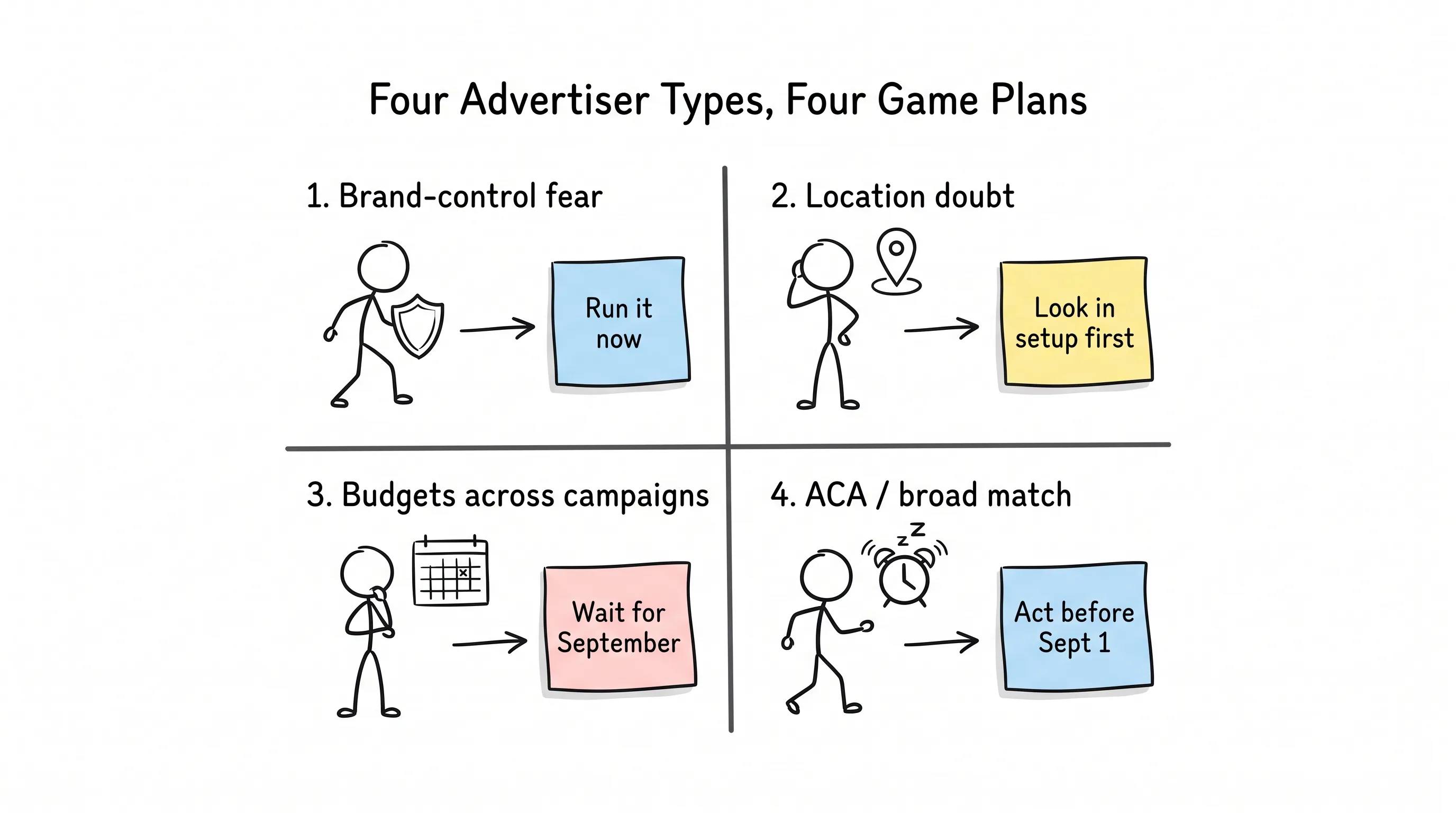
Type one: those who feared losing brand control. Your concern has now been answered, verbatim, by the documentation: Step 5, symmetric arms, automatic rollback. Run it. The experiment you've been dodging all along is now doable.
Type two: those afraid of the location-control question. Don't rush to test — open experiment setup and look first. If the location step is there, go ahead; if not, run with brand guardrails only and leave location as an open case.
Type three: those who want to test budgets and ROAS (return on ad spend) across campaigns. This feature is explicitly marked for a September rollout, with no date given. Don't slot what hasn't shipped into your Q4 testing calendar, and don't promise anyone a date. What you can do now is practice single-campaign experiment design.
Type four: accounts with ACA (Automatically Created Assets) or campaign-level broad match. You have an alarm clock — and someone else already set it for you.
Type four deserves a few more words.
On April 15 this year, Google announced that these two types of campaigns would auto-upgrade to AI Max starting September 1, completing by the end of September. In other words: right now, the upgrade is in progress. DSA (Dynamic Search Ads) was pushed back separately to February 2027 — that's a different timeline, and it doesn't touch this.
Then a key move: Google Ads API v25.1, which shipped on August 19, added two migration-date fields to Campaign. Before designing any experiment, pull those two fields first.
Why pull them? Because if Google is going to migrate you anyway, the difference between volunteering an experiment and being passively migrated is huge: in the former, the guardrails are the ones you set; in the latter, you inherit the defaults.
Rather than be upgraded by default, run an experiment first — with guardrails of your own choosing.
Oh, and whether these two fields will get dates filled in before migration — Google hasn't said. So if you check and they're empty, don't read that as "not scheduled"; read it as "unknown," and check again in a while.
One more thing: the September changelist doesn't stop at one item. In late September, manual language targeting will also be removed from Search campaigns. When you plan, don't fixate on this single post.
Six Roadblocks: Count Them First
Before you act, there's one more checklist to get through.
The Help documentation lists six kinds of campaigns that can't go through this experiment flow: those with text customization turned on (the old ACA), those serving on the Display Network, those using portfolio bidding strategies, those using shared budgets, those with Bidding exploration enabled, and those already running an experiment.
Shared budgets and portfolio bidding are the most common in mature accounts. So step one isn't designing an experiment — it's taking inventory: which campaigns can't reach this flow at all, and which need structural changes first.
Once you've taken inventory, here's the sequence I've laid out for you:
-
Pull the migration-date fields first — every ACA and broad match campaign, no exceptions.
-
Check experiment eligibility against the six roadblocks.
-
Open experiment setup, confirm whether the brand step is there, and see whether location controls show up. That one look is more accurate than any article.
-
Set the brand guardrails once; they take effect on both sides. And decide in advance whether, if the experiment wins, you'll apply it. That decides whether the guardrails stay or roll back.
-
Run Performance Planner in parallel — forecast first, then apply, for every budget change that needs making, with Bulk actions as your undo button.
-
Put cross-campaign testing on the after-September to-do list — not in September's commitments.
Finally
Back to the friend from the opening.
After that dinner, he went back and dug through the Help docs. Step 5, in black and white. The next day, the first AI Max experiment in his account was running — brand exclusions hung on both sides.
The big direction was settled long ago: AI Max is turning from "a switch you can flip" into "the default state of Search campaigns." This September it's ACA and broad match; February 2027 is DSA's turn. Every additional testing control is really Google handing you one more chance: make up your own mind before the default arrives.
This window is measured in weeks.
May every experiment you run have guardrails that you set yourself.
Continue reading
Related articles

Cross-Border Business: Time to Upgrade Your AI Toolbox
A learn article explaining how AI tools help cross-border e-commerce sellers clear five hurdles: language, regulation, logistics, payments, and fraud. It outlines a five-compartment toolbox, a five-step adoption path, and metrics such as conversion rate and CLV, while cautioning against over-reliance on AI.

AI Is Taking Over the Dirty Work of Social Media Marketing, One Task at a Time
This learn article outlines four social media marketing tasks AI can handle — audience analytics, content drafting and design, ad targeting and creative testing, and spam moderation — and cautions that taste, judgment, and data security remain human responsibilities.

AI Is Already This Good — Why Is Your Social Media Marketing Still Pure Manpower?
An overview of 18 AI tools for social media marketing, organized into six categories covering audience research, content creation, scheduling, comment and DM handling, ad management, and visual production, plus notes on personalization, prediction, and emerging trends.